

Ministry Operations Platform · Live product
Emkay Church Platform
One system for a church's whole week — not just Sunday.
17
Public-facing pages
18
Operations modules
3
Role tiers — Member, Staff, Pastor
5-in-1
Tools replaced by one login
Where most churches are today
A church's digital life, held together with tape
Ask most church offices what runs their week and the answer is a stack, not a system. The website lives on a page builder nobody on staff can safely edit. Membership records live in a spreadsheet, or a church-management tool the site can't talk to. Attendance is a paper sheet an usher tallies by hand. The weekly email goes out from a separate marketing tool the pastor has to remember to log into. Giving runs through yet another processor's checkout page. Sermon videos live on YouTube, the sermon notes live in a Facebook post, and the book table has never once been online.
None of these tools were built for a congregation. They were built for a generic small business, and a church has been asked to make do — paying five separate subscriptions, keeping five separate logins straight, and calling a developer every time a service time changes or a new sermon series needs a page.
What Emkay Digitals built instead
One codebase, one database, one login for staff
Proven on Grace & Light Church
The public website and the tools that run the ministry behind it, built as a single system from the start rather than stitched together after the fact. Visitors get a fast, modern site built around how people actually decide to visit a church: what you believe, when the doors open, what it's like to walk in.
Staff get a private dashboard behind that same site where they manage members, track attendance, send targeted emails, review giving, and publish new content — books, events, sermon series, blog posts — the moment it's ready, with no rebuild and no deploy. A pastor sees a plan-a-visit request the moment it lands, not after someone remembers to check a shared inbox.
It was built and proven on Grace & Light Church's live site — every module below is running code, not a mockup.
What a visitor sees
The public-facing site
Home & About
Mission statement, stat counters, leadership team, and a clear path to "plan a visit" — the same rhythm that turns a curious search into a first Sunday.
Ministries
Men's, women's, youth, outreach — each with its own card, icon, and description, so newcomers self-select where they belong.
Livestream
The player auto-detects when the church's YouTube channel goes live and switches automatically — no one has to remember to paste a link. A Bible panel lets viewers look up any verse without leaving the stream, and a comment feed lets the congregation greet each other in real time.
Teachings library
Series pages link out to individual messages — speaker, date, duration, and the YouTube video — so a decade of teaching stays discoverable instead of scrolling off a channel page.
Book store
Cover, author, price, and category filtering for every book or resource the ministry publishes or recommends — the table by the door, online.
Events
Conferences, revivals, and outreach dates each get their own page with a live countdown, location, and a one-tap way to register interest.
Give
Stripe-powered giving for one-time and weekly/monthly recurring gifts, embedded directly on the Give page and inside the livestream itself, so an offering moment doesn't require anyone to open a second tab.
Blog
A full blog with categories and author bylines — written and published from the dashboard the same afternoon it's needed.
Contact & membership
Contact form, membership sign-up, and a dedicated first-timer path all write straight into the staff dashboard — no message left sitting in an inbox no one checks.
Prayer requests
A visitor can mark a prayer request confidential — and the database itself, not just the interface, restricts who can ever read it to the senior pastor. Regular staff cannot see it, full stop.
Salvation decisions
A dedicated decision page feeds straight into a dashboard list the pastoral team can follow up on — the moment that matters most, no longer relying on a paper card.
GPS check-in
Members check themselves in on arrival, location-verified against the church's coordinates; staff can also check someone in manually. Every check-in feeds attendance reporting and follow-up messaging automatically.
What staff run the ministry on
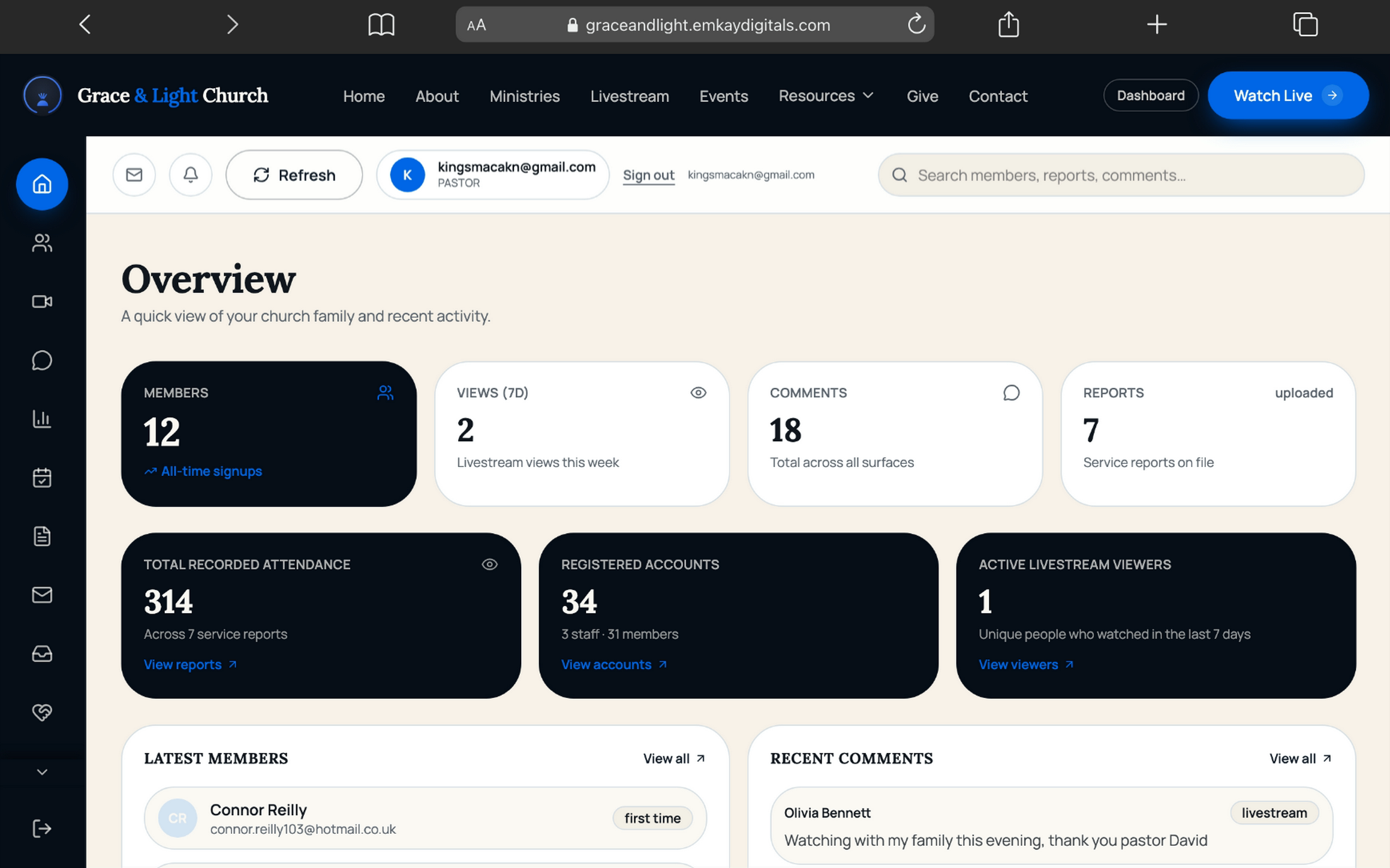
The operations dashboard
This is the part most websites don't have at all — one login, three levels of access, everything the public site collects flowing straight in.
People & access
4 modulesMembers
A full member directory built from every sign-up — pastors can edit or remove records; staff keep read access without the ability to alter them.
Viewers
Who's watching the livestream, right now and historically — engagement data a paper attendance sheet never gave you.
Comments
Moderate the livestream comment feed from one place, including messages left by non-members.
Accounts
Manage staff access itself — promote a volunteer to Staff, or a Staff member to Pastor, with permissions that change instantly.
Services & growth
4 modulesAttendance
Every GPS and manual check-in, by service date, broken down into adults, men, women and children.
Service reports
Ushers log headcounts and first-timer counts even without the check-in app — the two data sources reconcile in one report.
Event interest
Every "I'm interested" from the Events pages, ready to become an audience for a reminder campaign.
Salvation decisions
Every decision for Christ, logged with contact details for pastoral follow-up — never left to memory.
Communication
4 modulesMessaging
Compose an email and target it precisely: everyone present on a given Sunday, everyone absent, a specific person, or everyone interested in one event. Send now or schedule for later — a background job dispatches scheduled sends automatically.
Newsletter
A standing subscriber list, separate from membership, for the wider mailing audience.
Contact messages
Every message from the Contact page, in one inbox instead of a shared email account.
Prayer requests
Standard requests visible to staff and pastors; requests marked confidential visible to the pastor alone.
Content — the in-house CMS
4 modulesBooks
Add, edit or retire a title — cover image, author, price, category — live on the store the moment it's saved.
Events
Publish a new conference or service date with its flyer and details, no developer required.
Teachings
Build a new sermon series and add each message to it as it's preached, in order.
Blog
Write and publish a devotional or announcement straight from the dashboard's editor.
Finance
1 module · pastor-onlyOfferings
Giving records, visible only at the pastor access tier — financial data kept out of general staff view by design, not by convention.
At a glance
1 moduleOverview
The dashboard's front page — attendance trend, recent sign-ups, and open items across every module, so a pastor's Monday morning starts with a summary, not seventeen separate checks.
What it's built on
Trust & infrastructure
Every access rule is enforced at the database, not just hidden in the interface — a member who inspects the network tab can't see what a pastor sees.
Access control
Three tiers — Member, Staff, Pastor — enforced by row-level security policies on the database itself, not by hiding a button in the interface.
Confidentiality
A prayer request marked confidential is unreadable to anyone below the pastor role — verified at the data layer, not the page layer.
Attendance integrity
GPS check-ins are location-verified and timestamped against the church's coordinates, with manual check-ins logged separately for audit.
Automated messaging
Scheduled campaigns dispatch themselves through a background job running every minute, via Resend — nothing depends on staff remembering to press send.
Live integrations
YouTube Data API for live-service detection, scripture.api.bible for the in-stream Bible panel, and Stripe for one-time and recurring giving.
Foundation
React 19, TanStack Start/Router, and Supabase (Postgres, Auth, Storage, and scheduled Edge Functions) — a modern, actively maintained stack rather than a legacy CMS plugin chain.
Content ownership
Every book, event, sermon and post lives in the church's own database, exportable at any time — not locked inside a third-party page builder.
How it plays out for one visitor
From a Google search to a member
Discover
Finds the church through search or social, lands on a fast, mobile-first site that answers "what do they believe" and "when do doors open" in the first screen.
Watch or visit
Joins Sunday's livestream — with the Bible panel open and live comments running — or plans an in-person first visit from the Ministries or About page.
Check in
Arrives and checks in by GPS, or is checked in manually at the door — attendance logged the instant it happens, not re-keyed from a paper sheet on Monday.
Connect
Submits a prayer request, registers interest in the next event, or makes a salvation decision — each one lands directly in front of the right staff member.
Give
Sets up a one-time or recurring gift without leaving the site — from the Give page or right inside the livestream.
Grow
Joins the newsletter, works through a teaching series, and starts showing up in targeted follow-up messaging built from their own attendance and interests.
Common questions
Questions church leaders ask us
We already have a church management system.+
The pitch isn't "replace your ChMS" — it's "stop paying for a website and a ChMS that don't talk to each other." A sign-up on your site, a check-in at the door, and a targeted email become one connected flow here, instead of an export from one tool and an import into another.
Our team isn't very technical — who keeps this updated?+
That's exactly who this was built for. Every content change — a new sermon series, a new book, a new event flyer — is a dashboard edit, live in seconds. No developer on call, no waiting on anyone.
Can we see it working with a real congregation first?+
Yes — it's live in production today, not a concept. Every module on this page is running code Grace & Light Church's team uses every week. Book a walkthrough and we'll show you real data, not a demo account.
Is our members' data secure, and do we actually own it?+
Every access rule is enforced at the database itself, not just hidden in the interface — a member can't see what a pastor sees, full stop. And every book, event, sermon and post lives in your own database, exportable at any time. Nothing is locked inside a page builder you don't control.
We're not ready to switch systems right now.+
No pressure — most churches take their time on this decision. Leave your email below if you'd like to stay in the loop without committing to a call.
Ready now
Talk to us about your church.
Book a walkthrough with real data — no demo account, no pressure.
Not ready yet
Not ready for a call yet?
Get occasional updates on the platform — no commitment.
Get started
Bring this to your church.
Tell us a little about your church and we'll walk you through the public site and the dashboard together, with real data, in one sitting. We reply within 24 hours.
More solutions
Keep exploring
Let's build something that endures
Ready for a website that runs your work?
Tell us about your church, NGO or business — wherever you are. We reply within 24 hours with next steps.
Start a project ↗